Monday, 15 April 2013

unseened places in google maps
Rare places could not be found in google maps
Google Maps which was formerly known as Google Local is a web mapping service application and technology provided by Google, that powers many map-based services. Google Maps satellite images are not updated in real time; they are several months or years old. Though it shows all the images of place around the world, there are some place which is blocked or blurred by Google for various reasons. Here we have collected a list of 10 such places which cannot be seen using Google maps. Take a look...

1. The Royal Residence, The Netherlands

The Royal Palace of Amsterdam in the Netherlands called Koninklijk Paleis Amsterdam. It joins a long list of places blurred on Google Maps related to the Dutch royal family, including the Royal Stables and another residence called Huis ten Bosch.
2. Buffalo Niagara International Airport

The Buffalo Niagara International Airport is largely white out on Google Maps and details can’t be seen when the area is zoomed in.
3. Tantauco National Park, Chile

The Tantauco National Park in Chile can only be seen from a marker via Google Maps. The private natural reserve is home to many endangered animals.
4. Keowee Dam, South Caroline

Man-made reservoir Keowee Dam on Lake Keowee in South Carolina is also blurred on Google Maps. Shaped like a Christmas tree, the dam helps run a power utility called the Duke Energy Company.
5. Mysterious Russian Site

We’re not entirely sure why this location in Russia has been blurred out, especially since it’s in the Siberian tundra. The closest city is Egvekinot, Russia, which is a neighbor to Alaska across the Bering Strait.
6. Minami Torishima Airport, Japan

The Minami Torishima Airport, a one-runway airport serving the island of Minami Torishima, located off the east coast of Japan. It is over saturated with white. It is currently used by the Japan Maritime Self-Defense Force.
7. The Michael Aaf Building, Utah

The Dugway Proving Ground in Dugway, Utah is a region occupied by the U.S. Army where the military can test biological and chemical weapon systems. The Michael Aaf building on the proving ground is white out, most likely for security reasons.
8. Cornell University Combined Heat and Power Plant, New York

The Cornell University Combined Heat and Power Plant in Ithaca, NY which was opened in 2010, is blurred on Google Maps. The high-tech, Eco-friendly facility generates electricity from natural gas as a part of the university’s effort to lower its carbon dioxide emissions.
9. Babylon, Iraq

For some security reasons, the city of Babylon, Iraq looks more like endless farmland than a bustling city.
10. Vlissingen, The Netherlands

Properties owned by the Dutch royal family aren’t the only places blurred in the Netherlands. Joining the list are the oil tanks in Vlissingen, as well as several army bases and air force bases. The land area to the left also appears to be pixilated and adjusted.

1. The Royal Residence, The Netherlands
The Royal Palace of Amsterdam in the Netherlands called Koninklijk Paleis Amsterdam. It joins a long list of places blurred on Google Maps related to the Dutch royal family, including the Royal Stables and another residence called Huis ten Bosch.
2. Buffalo Niagara International Airport
The Buffalo Niagara International Airport is largely white out on Google Maps and details can’t be seen when the area is zoomed in.
3. Tantauco National Park, Chile
The Tantauco National Park in Chile can only be seen from a marker via Google Maps. The private natural reserve is home to many endangered animals.
4. Keowee Dam, South Caroline
Man-made reservoir Keowee Dam on Lake Keowee in South Carolina is also blurred on Google Maps. Shaped like a Christmas tree, the dam helps run a power utility called the Duke Energy Company.
5. Mysterious Russian Site
We’re not entirely sure why this location in Russia has been blurred out, especially since it’s in the Siberian tundra. The closest city is Egvekinot, Russia, which is a neighbor to Alaska across the Bering Strait.
6. Minami Torishima Airport, Japan
The Minami Torishima Airport, a one-runway airport serving the island of Minami Torishima, located off the east coast of Japan. It is over saturated with white. It is currently used by the Japan Maritime Self-Defense Force.
7. The Michael Aaf Building, Utah
The Dugway Proving Ground in Dugway, Utah is a region occupied by the U.S. Army where the military can test biological and chemical weapon systems. The Michael Aaf building on the proving ground is white out, most likely for security reasons.
8. Cornell University Combined Heat and Power Plant, New York
The Cornell University Combined Heat and Power Plant in Ithaca, NY which was opened in 2010, is blurred on Google Maps. The high-tech, Eco-friendly facility generates electricity from natural gas as a part of the university’s effort to lower its carbon dioxide emissions.
9. Babylon, Iraq
For some security reasons, the city of Babylon, Iraq looks more like endless farmland than a bustling city.
10. Vlissingen, The Netherlands
Properties owned by the Dutch royal family aren’t the only places blurred in the Netherlands. Joining the list are the oil tanks in Vlissingen, as well as several army bases and air force bases. The land area to the left also appears to be pixilated and adjusted.
Saturday, 13 April 2013
Friday, 12 April 2013
HOW TO HOST WEBSITE ON GOOGLE DRIVE
As we all are aware about Google Drive, which comes by default with your Google account. Google Drive is a great way to store and share your files publicly & privately and access them from anywhere. Google Drive
enables user with cloud storage, file sharing and collaborative
editing, which comes with 5GB of free space. Recently, Google added a
feature to Drive where in user can upload HTML, CSS and JavaScript files
and can host and share it publicly. You can now create your own
personal dummy site, personal portfolio or demonstrate your website
draft created for clients. However, make sure you are not using this to
create any professional page or website since this is not a full-fledged
host.
Before you get too enthusiastic about this, Google is not providing a
complete full-fledged hosting option. Anything other than HTML, CSS and
JavaScript which require server-side technologies like PHP, MySQL, etc.
it will not work. There is no DNS or mapping of your website name. The
URL for the page would be something like below.
However, we believe that this feature would come very handy for web developers to view their web pages online and can share the same with the client who can see it online on their browser. This can also be useful, if someone wants to create a personal profile or portfolio.
How to Host Webpages on Google Drive
1. Create Folder and make it Public- Go to Google Drive, Click on CREATE and select Folder Name the folder.
- Right-Click on the folder –> select Share –> Share
- Change access rights from “Private” to "Public on the web” and Click on Done.

2. Upload Web pages (HTML, CSS & JavaScript)
- Once Folder is created with public share rights, Upload HTML, CSS or JS files from local system which can be done simply by drag & down of file or click on upload button, browse and upload the file.

- To edit or create HTML, CSS or JS file on Google Drive, you need to install a third-party apps like Drive Notepad, Neutron Drive. However, we have simply created the html file on local system and uploaded on Drive.
- Click on the html page and click on “Preview” button. Your page is now live and can be seen by anyone on the web.
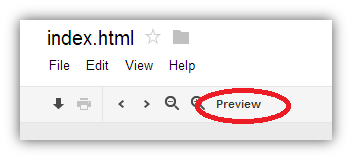
- Copy the web address of the page to share with others.
Also Check out an example where in Google’s own hosted webpage in Google Drive.
HOW TO CHANGE GOOGLE PAGE BACKGROUND
Google last year announced and discontinued the feature to customize
Google page background. This feature allowed users to change Google Homepage background with any images on computer or web. Lately, one of our readers has asked us on “Is there any way that I can change Google Homepage Background."
Though the feature is removed from Google but there are some
alternative to change Google’s homepage background without any trouble.
If you to miss the feature of customizing Google homepage background, then follow the below alternative guide to change your Google homepage.

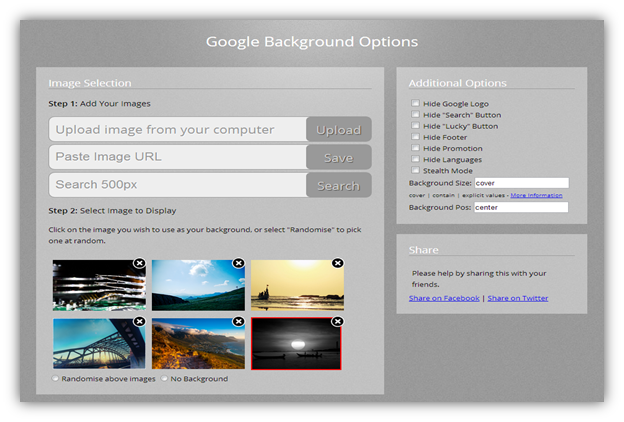
2. Once it’s installed, you will see a new tab popping. You can now select image from your computer or paste image URL or search image from the web.

3. Once the image is loaded from computer or from the web, select the image that you want as Google’s homepage background.
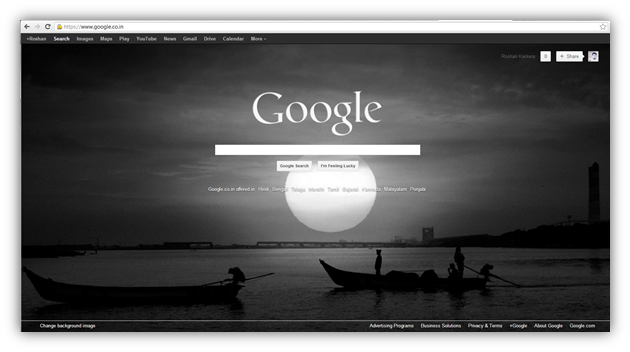
Now open Google homepage and you will see a customized Google Homepage.

With Custom Google Background chrome addon, you can now customize the
look of Google home page where in you can change the background with any
image from your computer or web. Moreover, you can also remove the
Google logo, search and lucky buttons, footer, and promotional links
from the Google search page.
Change Google Homepage Background
1. Install Custom Google Background chrome addon on Google Chrome browser.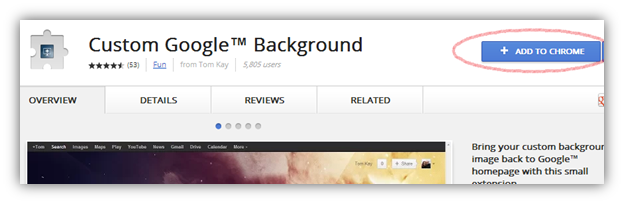
2. Once it’s installed, you will see a new tab popping. You can now select image from your computer or paste image URL or search image from the web.
3. Once the image is loaded from computer or from the web, select the image that you want as Google’s homepage background.
Now open Google homepage and you will see a customized Google Homepage.
Subscribe to:
Posts (Atom)